Open X without logging in (formerly known as XXCancel)
Redirecting to Nitter/teapawt
Choose an instance below, or wait for automatic redirection.
You can choose a different instance at any time. Any click or key press during the countdown pauses it; clicking an instance opens your link there.
Selected instance: https://shitter.thepixora.com
Choose an instance
Click any instance to open your link there. Every instance opens the same destination:
/jlcjak/status/2119917708846260729. Clicking an instance also pauses the automatic redirection.
- shitter.thepixora.com /jlcjak/status/2119917708846260729 auto-selected
- xcopy.uk /jlcjak/status/2119917708846260729
- xitter.cf /jlcjak/status/2119917708846260729
- nitter.r4fo.com /jlcjak/status/2119917708846260729
Other instances
- nitter.netbub.com /jlcjak/status/2119917708846260729
- nitter.xitter.cc /jlcjak/status/2119917708846260729
- nitter.jaydenha.uk /jlcjak/status/2119917708846260729
- nitter.click /jlcjak/status/2119917708846260729
- x.yuuki.sh /jlcjak/status/2119917708846260729
- nitter.freedit.eu /jlcjak/status/2119917708846260729
- nitter.kareem.one /jlcjak/status/2119917708846260729
- shi.meowing.de /jlcjak/status/2119917708846260729
- nitter.tiekoetter.com /jlcjak/status/2119917708846260729
- nitter.meowing.monster /jlcjak/status/2119917708846260729
- lightbrd.com /jlcjak/status/2119917708846260729
- xnologin.com /jlcjak/status/2119917708846260729
- nitter.mie.foundation /jlcjak/status/2119917708846260729
- nitter.mizuki.st /jlcjak/status/2119917708846260729
Firefox not showing images?
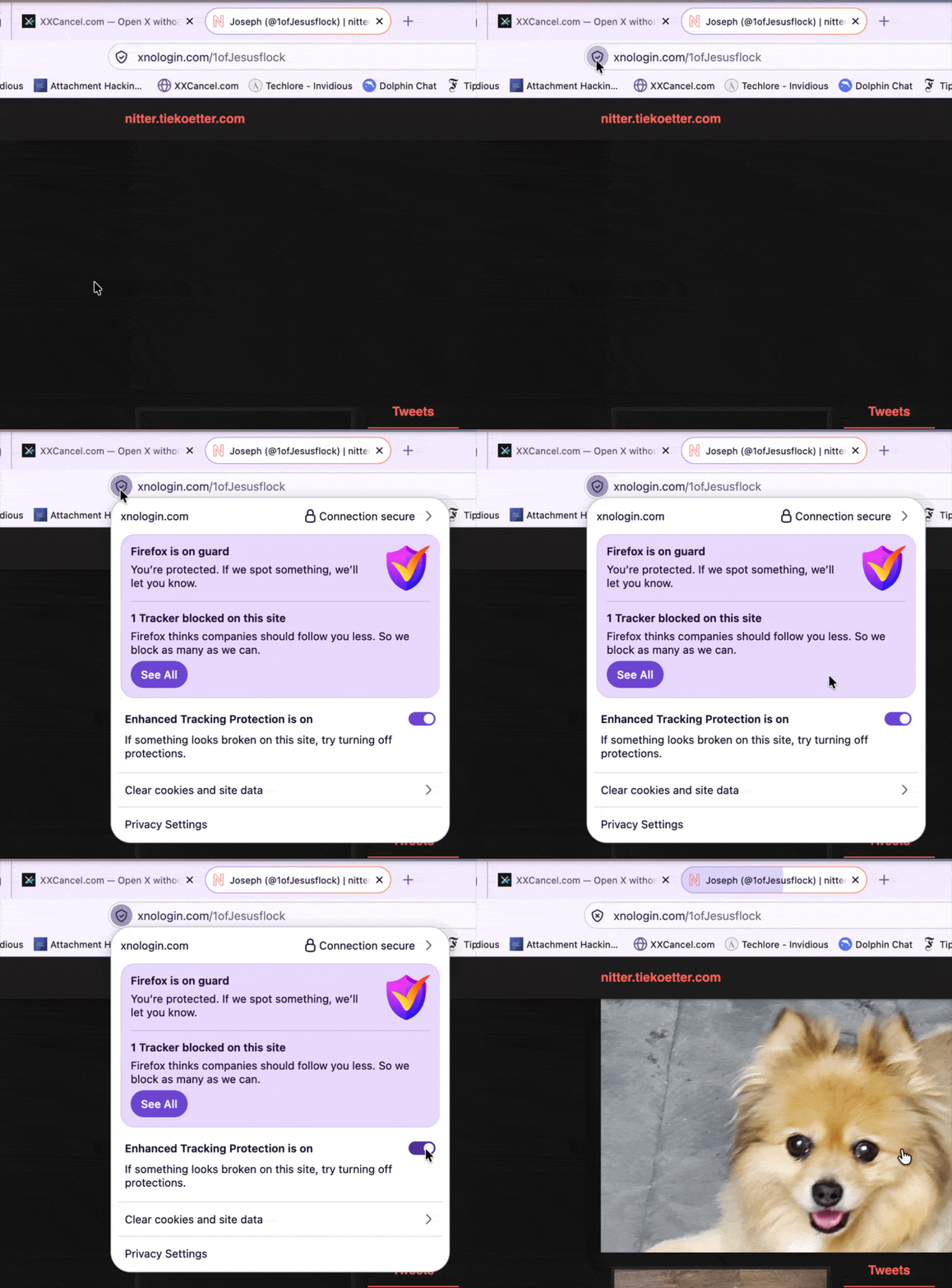
Firefox's Enhanced Tracking Protection can block profile pictures and attached images on Nitter/teapawt instances. These instances don't proxy the media, so images load directly from X and Firefox treats them as cross-site trackers.
To fix it, turn off Enhanced Tracking Protection for the instance you're viewing: click the shield icon in the address bar and switch the toggle off for that site.
Make this automatic: Install the Tampermonkey userscript.
Make this easier next time: Get the bookmarklet.